
In December 2021, a teammate messaged me with a simple question. Did we have a signed media release from one of our partners? A colleague wanted the partner's photos for a fund update. I checked DocuSign and found nothing. My teammate had also noticed I wasn't saving signed forms to our shared Drive folder anymore. I was backlogged on it, and I said I'd catch up.
That backlog was on me, but it showed a bigger problem. The whole process depended on someone remembering to download, rename and file each signed form. If that last step didn't happen, nobody else on the team could tell whether we had the release.
At Tides, our Marketing and Communications team told partner stories through blog posts, podcasts and events. Before anything went live, every person in a photo, quote or recording had to sign a media release. If we couldn't find the release, we couldn't publish.
Why the last step kept slipping
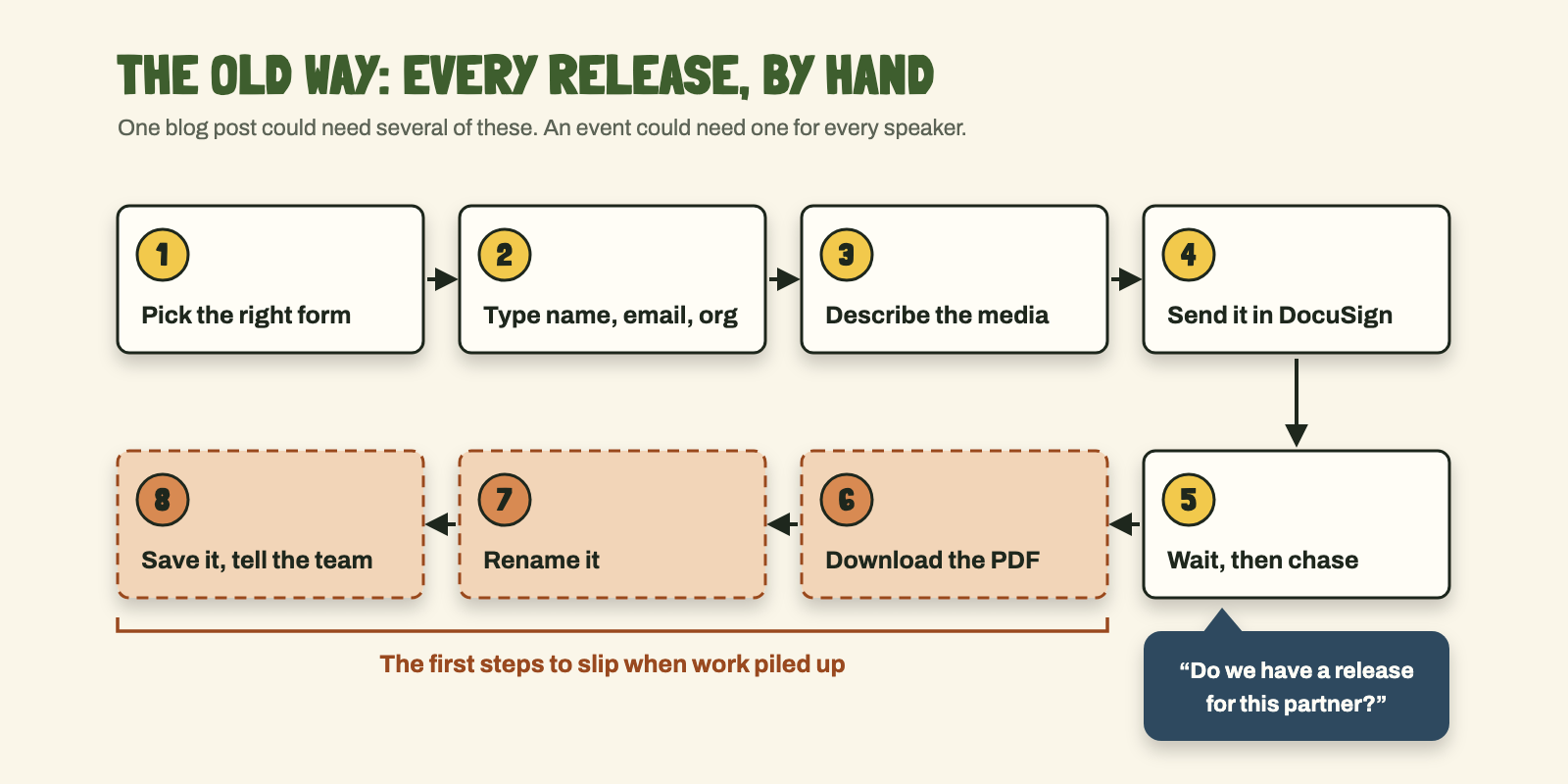
Every release took the same steps. Pick the right version of the form. Type in the signer's name, email and organization, plus a description of the photos or recording. Send it through DocuSign and wait. Once it came back signed, download the PDF, rename it, save it to the right Drive folder, and tell whoever asked for it.
One blog post could need several releases, and an event could need one for every speaker. Sending the request was visible. Filing it afterward wasn't. When work piled up, the filing was the first to slip. Then nobody could answer "do we have permission?" without digging through DocuSign and old emails. Often I was the one digging.
The form itself was a hurdle too. Our older release asked for rights "in any and all media, now or hereafter known," and some people didn't want to sign it. A teammate pushed for a friendlier version, which our legal team approved in 2021. When one event speaker's marketing team still objected, I drafted an event-only release for Legal to clear. Legal cleared it six days before the event, and the signed form came back the day before. That same day I accidentally sent the speaker the old form again.
Making the paperwork file itself
I'm not a developer, but I love finding the tool that takes a step off someone's plate. I built this in pieces, around the tools Tides already paid for: Airtable, DocuSign and Google Drive. Instead of starting with an automation tool, I started with a simpler question. What would a teammate need to find when the job was done?
START WITH WHERE THE FILE ENDS UP
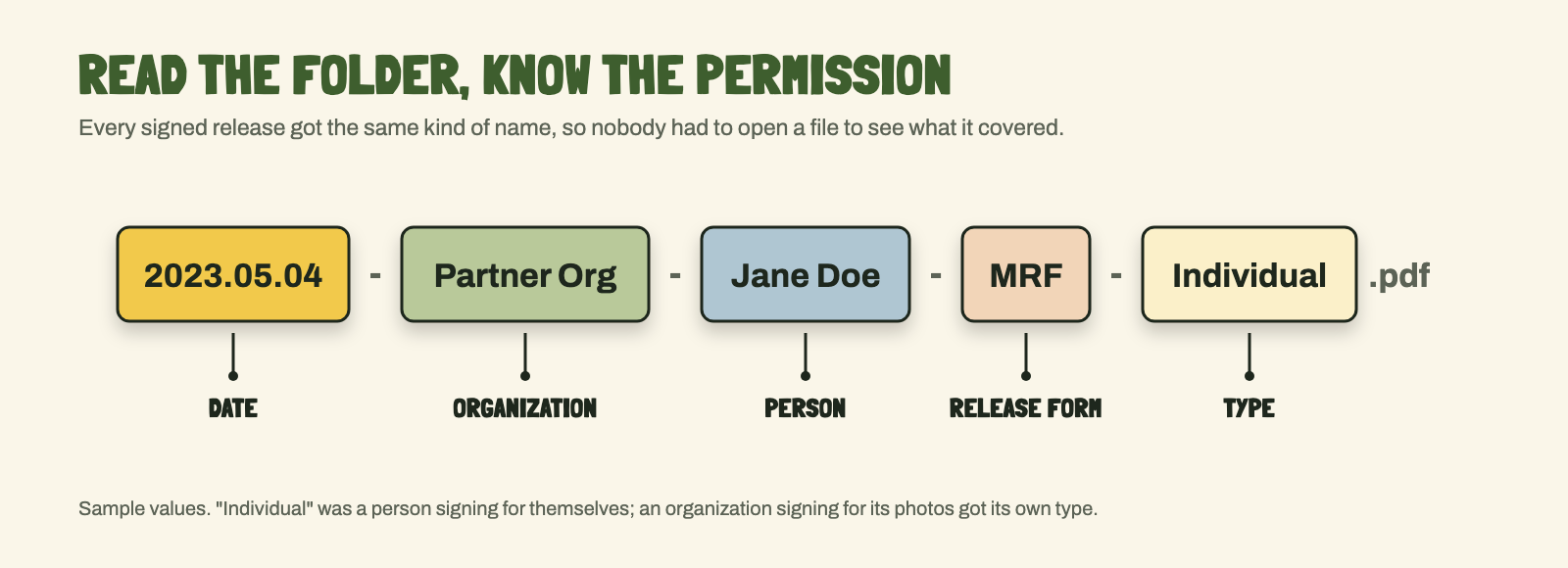
The same teammate suggested naming every signed release by date, organization and person, so anyone could check permissions just by scanning the folder. Eight days later I'd downloaded all the recent signed forms, renamed them that way, and told my teammate I'd set up an automation next. The format also gave us a shared idea of a finished job: a signed form anyone could find without asking me where I'd put it. That file name became the finish line for everything I built after.
A good file name only helps if the file gets saved. Four months later, a teammate asked about a release for someone whose headshot was already on our blog. I checked DocuSign, our Drive and my email and couldn't find one. I may have skipped that step.
ONE TEMPLATE FOR EACH KIND OF RELEASE
I set up six DocuSign templates, one for each situation we kept running into: a person signing for themselves, an organization signing for its photos, an event, a podcast guest. Before that, I'd fixed the sender. DocuSign still listed a coworker who used to send releases, and one speaker replied to that coworker by name. A few minutes later I changed the sender to "Tides MarComms."
LET THE FORM DO THE TYPING
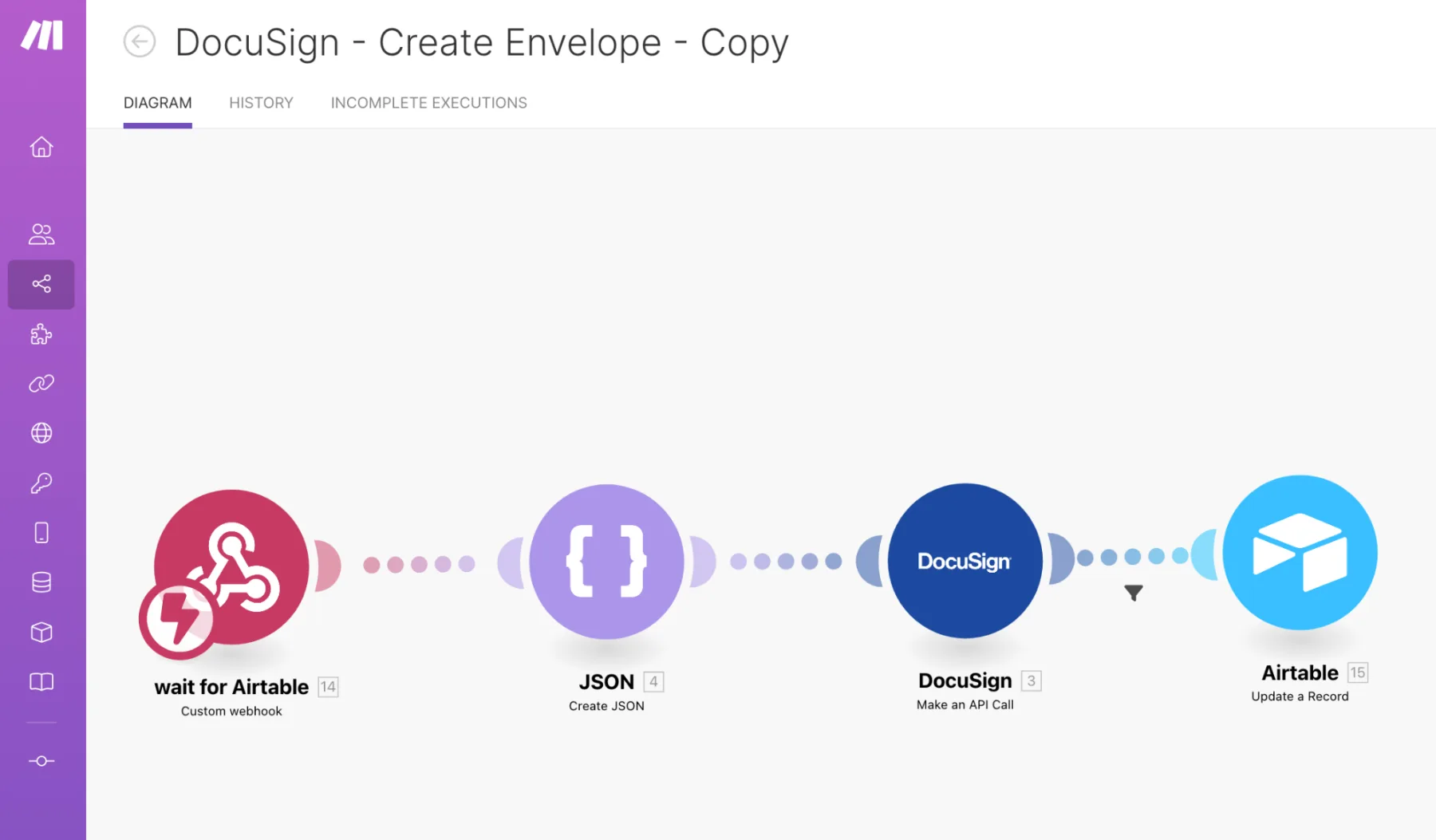
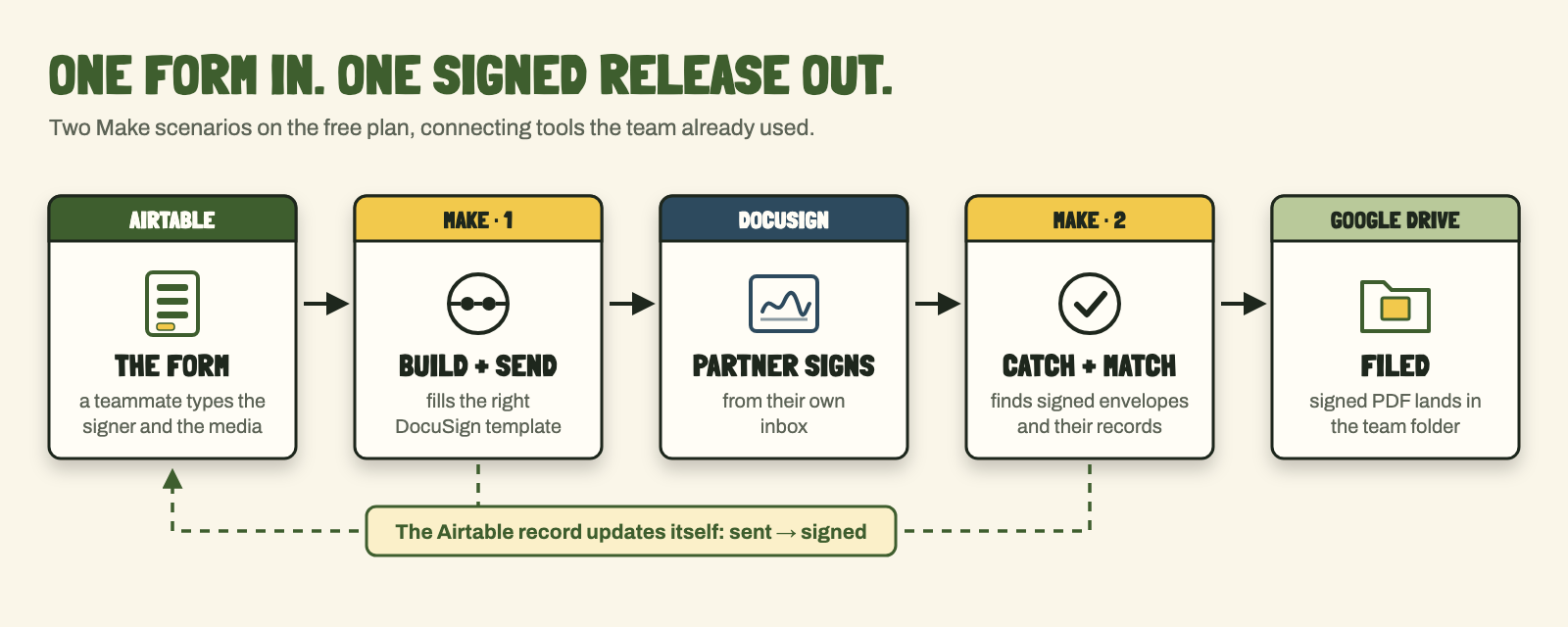
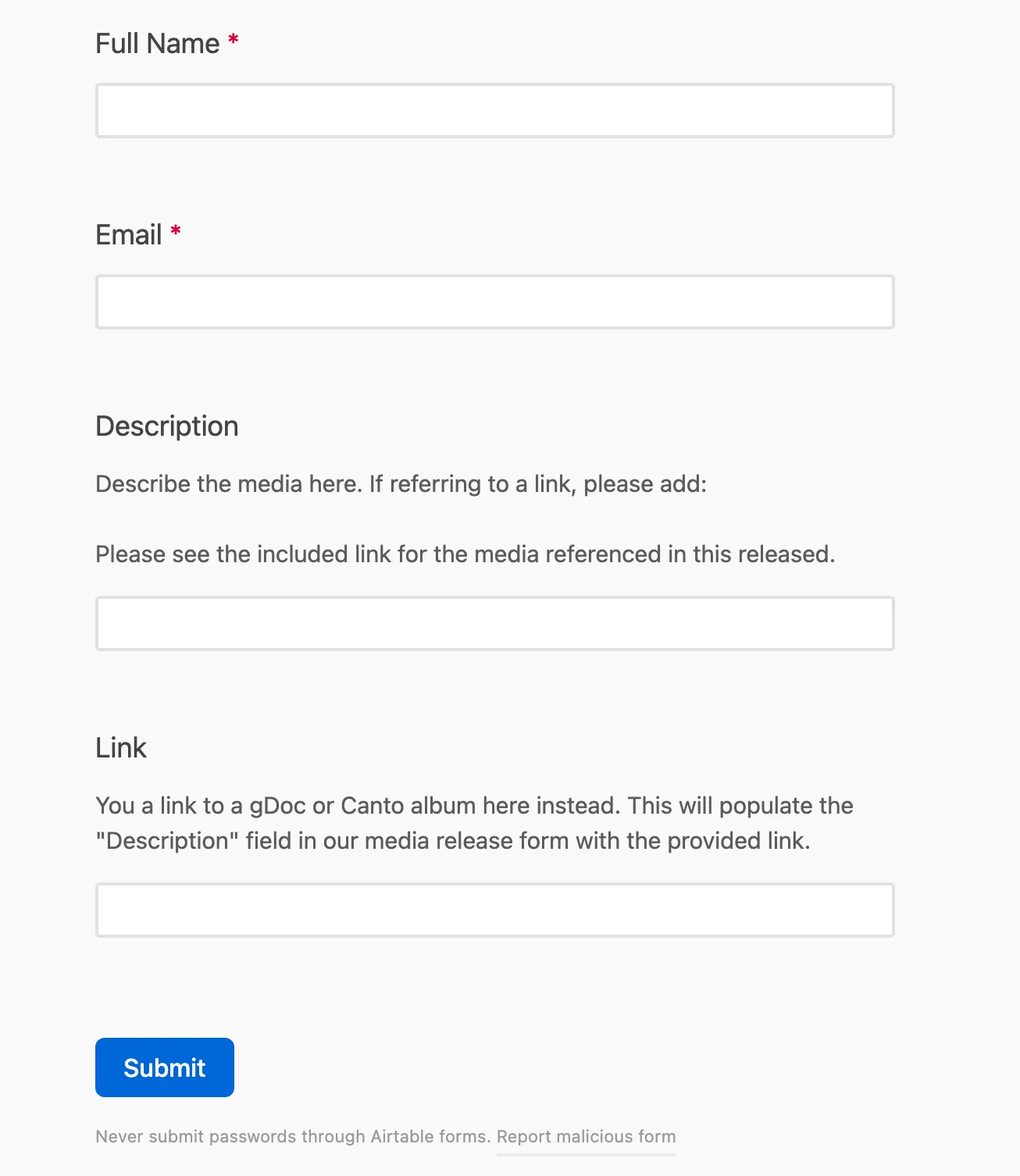
Teammates fill out a short Airtable form with the signer's name, email, and a description of the media or a link to the photo album. The description mattered. A teammate once asked what an organization's release even covered if it didn't describe any photos. A small script sends that entry to Make, a tool that connects apps. Make fills in the DocuSign envelope and sends it to the signer. Nobody has to open DocuSign.
LET SIGNED FORMS FILE THEMSELVES
A second Make scenario checks DocuSign for signed envelopes and matches each one to its Airtable record. It renames the signed PDF to our naming format and saves it to our Drive folder. The record's status updates on its own, so the team can see what's still out.
KEEP IT FREE AND KEEP IT IN THE TEAM
I'd pitched Zapier in 2022, and it wasn't approved. Make turned out to be more flexible and cheaper anyway, and both scenarios fit inside its free plan. Because everything sent from the team's DocuSign account, I kept the form inside our team.
UNDER THE HOODThe two scenarios, the templates and the cost
- Trigger: an Airtable form and automation script pass the record ID, name, email, organization, description and media link to a Make webhook.
- Scenario 1: webhook → build the request → DocuSign API call that creates and sends an envelope from a template → write the envelope ID and status back to the Airtable record.
- Scenario 2: check DocuSign for completed envelopes, match each to its Airtable record, rename the signed PDF to the naming format, and upload it to Google Drive.
- Templates: six DocuSign templates, created May 2022 to April 2023, all sent from the team's shared account.
- Cost: Make's free plan, which allows two active scenarios. Airtable, DocuSign and Drive were already in use.
- Before Make: a 2022 Zapier trial filed signed releases to Drive, but the subscription wasn't approved.
What changed
I estimate more than 100 releases went through the automation, often several for one post. Teammates sent their own releases without touching DocuSign. In early 2023 a coworker and I had split the work: I sent releases for events, and they took blogs and our photo library, using the same form to re-collect releases. By my estimate, hands-on time per release dropped from 30–40 minutes to 5–10. I never measured it.
The question from that December got easier, too. Answering "do we have the signed release?" no longer started with an email search. Signed forms showed up in Drive, already named, without anyone saving them.
It wasn't maintenance-free. The form sends exactly what you type, so a misspelled name meant canceling and resending. After the 2024 rebrand the template needed the new logo, and a teammate asked whether signed forms were still landing in the 2023 folder. I had to go back into the settings and check.
Looking back
The hard part was never DocuSign. It was the boring last step: what the file is called, where it goes, and how the next person knows it's there. Once a teammate and I agreed on that, the automation had a clear finish line. I'd start there again. I've since built Make automations for other organizations, and I still begin by asking where the finished file should end up.